

 Français
  Español
  Italiano
  Deutsch
  Nederlands
  Português

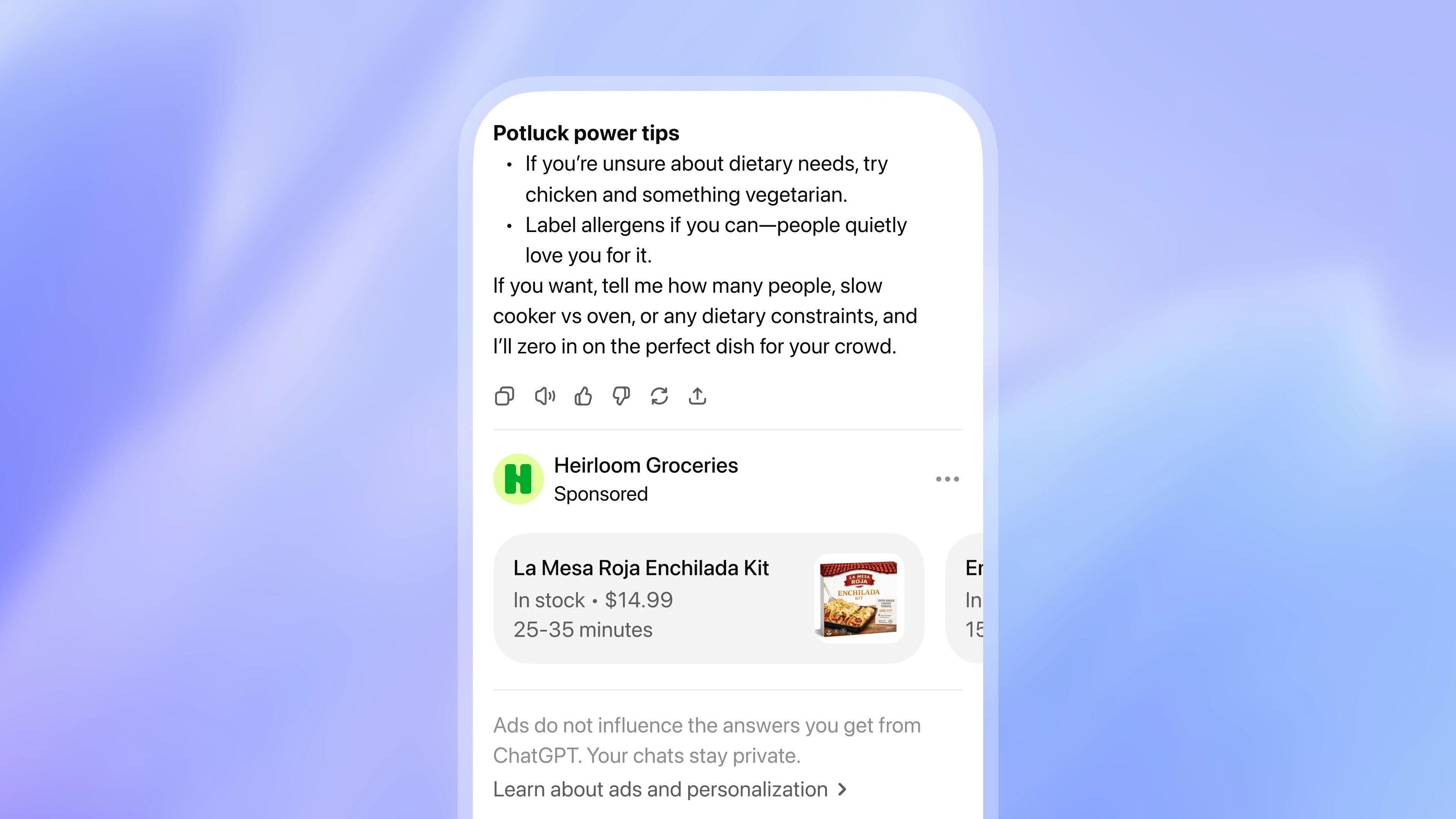
As a small business owner, you’ve probably heard about ChatGPT ads—a new way to reach customers where they’re already searching for answers. But setting up ad campaigns can feel overwhelming, especially if you’re not a marketing expert. What if you could create, launch, and optimize ChatGPT ads in minutes, without needing technical skills or a separate ad account?
With Paisible AI, you can. Our AI assistant handles everything for you, from campaign creation to payment and performance tracking. Here’s how it works and why it’s a game-changer for your local visibility.
Key Takeaways
- ChatGPT ads appear as "chat cards" in responses when users ask questions related to your business (e.g., "Where can I find fresh croissants near me?").
- Paisible AI creates, launches, and manages your campaigns—no separate ChatGPT account or marketing expertise required.
- You set your budget, and Paisible AI handles payments and reporting in one place.
- Campaigns are tailored to your trade (bakery, hair salon, repair shop, etc.) and local area.
- Track performance easily with clear reports on impressions, clicks, and conversions.
- Start for free and upgrade only when you’re ready to run ads.
Why ChatGPT Ads Matter for Small Businesses
ChatGPT isn’t just for answering questions—it’s a place where potential customers are actively looking for recommendations. For example:
- A user asks, "Where can I get a haircut in [your neighborhood]?" Your salon’s ad could appear as a "chat card" with your name, photo, and a link to book an appointment.
- A parent searches, "Best kids’ birthday cakes near me." If you’re a baker, your ad could show up with a mouthwatering photo and a direct link to your website.
These ads put your business in front of people who are already interested in what you offer—without the guesswork of traditional ads.
How Paisible AI Simplifies ChatGPT Ads
Most ad tools stop at giving you a draft. Paisible AI goes further: we create, publish, and manage your campaigns for you. Here’s how it works in practice:
1. Tell Your Assistant What You Need
No need to learn ad jargon or navigate complex platforms. Just tell your Paisible AI assistant what you want in plain language. For example:
- "Create a ChatGPT ad for my bakery."
- "I want to promote my hair salon’s new opening hours."
- "Run a ChatGPT campaign for my repair shop’s weekend special."
Your assistant knows your trade, location, and offers, so it generates a campaign tailored to your business.
2. Review and Approve Your Campaign
Paisible AI creates everything for you:
- A campaign name (e.g., "Bakery - Fresh Croissants - [Your Neighborhood]").
- Ad groups targeting the right audience (e.g., people searching for bakeries, desserts, or breakfast spots in your area).
- Ad content, including a title, description, image, and link to your website or booking page.
You review the campaign in your dashboard, make any tweaks, and approve it—no technical setup required.
3. Set Your Budget and Launch
You decide how much you want to spend. Paisible AI handles the rest:
- We act as your ad account, so you don’t need to create one on ChatGPT or Google Ads.
- You pay once via Stripe (your ad budget + a small management fee), and we handle payments to the platform.
- Your campaign goes live, and you can track its performance in real time.
4. Track Performance and Optimize
Paisible AI provides clear reports on:
- Impressions: How many people saw your ad.
- Clicks: How many visited your website or booking page.
- Conversions: How many took action (e.g., called, booked, or visited your shop).
You can pause, adjust, or relaunch your campaign anytime from your dashboard. No need to log into multiple platforms or decipher complicated metrics.
Real Examples by Trade
Here’s how different small businesses can use ChatGPT ads with Paisible AI:
Bakery: "Fresh Croissants in [Your Neighborhood]"
Your ad appears when users ask, "Where can I find fresh croissants near me?" The chat card includes:
- A photo of your best-selling croissants.
- A short description: "Warm, buttery croissants made daily. Visit us today!"
- A link to your website or Google Business Profile.
Result: More foot traffic and online orders from locals searching for a bakery.
Hair Salon: "Book Your Next Haircut in 2 Clicks"
Your ad targets users searching for "best hair salon in [your area]." The chat card includes:
- A photo of your salon or a stylist at work.
- A description: "Expert cuts, colors, and styling. Book online now!"
- A direct link to your booking page.
Result: More appointments booked without you lifting a finger.
Repair Shop: "Weekend Special: 20% Off Car Repairs"
Your ad reaches users asking, "Where can I get my car fixed near me?" The chat card includes:
- A photo of your shop or a mechanic at work.
- A description: "Reliable, fast repairs. 20% off this weekend only!"
- A link to call or visit your shop.
Result: More customers taking advantage of your promotion.
Do’s and Don’ts for ChatGPT Ads
Do:
- Be specific. Tell your assistant exactly what you want to promote (e.g., "a weekend special for my bakery" instead of "an ad for my business").
- Use high-quality images. A clear, appealing photo of your product or service makes your ad stand out.
- Monitor performance. Check your dashboard regularly to see what’s working and adjust as needed.
- Start small. Test a campaign with a modest budget before scaling up.
Avoid:
- Overcomplicating your message. Keep your ad description short and clear (e.g., "Fresh bread daily" instead of a long paragraph).
- Ignoring your audience. Make sure your ad speaks to local customers (e.g., mention your neighborhood or city).
- Setting and forgetting. Even if Paisible AI manages your campaign, check in occasionally to optimize results.
How to Get Started with ChatGPT Ads
Ready to try ChatGPT ads for your business? Here’s how to begin:
- Create a free account on Paisible AI. No credit card required to start.
- Tell your assistant what you want to promote (e.g., "Create a ChatGPT ad for my bakery").
- Review and approve the campaign your assistant generates.
- Set your budget and launch your ad.
- Track performance and adjust as needed.
That’s it! No marketing degree, no technical skills, and no separate ad accounts required.
FAQ
Do I need a ChatGPT account to run ads with Paisible AI?
No, you don’t need a separate ChatGPT account. Paisible AI handles everything for you, from campaign creation to payment and monitoring.
How much does it cost to run ChatGPT ads with Paisible AI?
You set your own budget. Paisible AI charges a small management fee on top of your ad spend, and you pay everything in one go via Stripe. There are no hidden costs.
Can I target local customers with ChatGPT ads?
Yes! Paisible AI tailors your campaigns to your trade and local area, ensuring your ads reach the right audience—whether they’re searching for a bakery, hair salon, or repair service nearby.
How do I know if my ChatGPT ads are working?
Paisible AI provides clear reports on impressions, clicks, and conversions. You can track performance directly in your dashboard and adjust your campaigns as needed.
Is it complicated to set up a ChatGPT ad campaign?
Not at all. Just tell your Paisible AI assistant what you want (e.g., "Create a ChatGPT ad for my bakery"), and it will generate a complete campaign for you to review and approve.
Start Today—For Free
ChatGPT ads are a powerful way to reach customers who are already looking for what you offer. With Paisible AI, you can create, launch, and optimize campaigns in minutes—without the hassle of traditional advertising.
Ready to give it a try? Create your free account today and see how easy it is to grow your business with ChatGPT ads.